
On this page:
Main Task - Sub Task - Task Labels - Task State - Task Result - Related articles
In inspectio you can perform tasks on your equipment. A task is always linked to equipment and stored in a project.
[screen recording]
Husk settings: Loop, mute, Hide controls, auto play
Main Task:
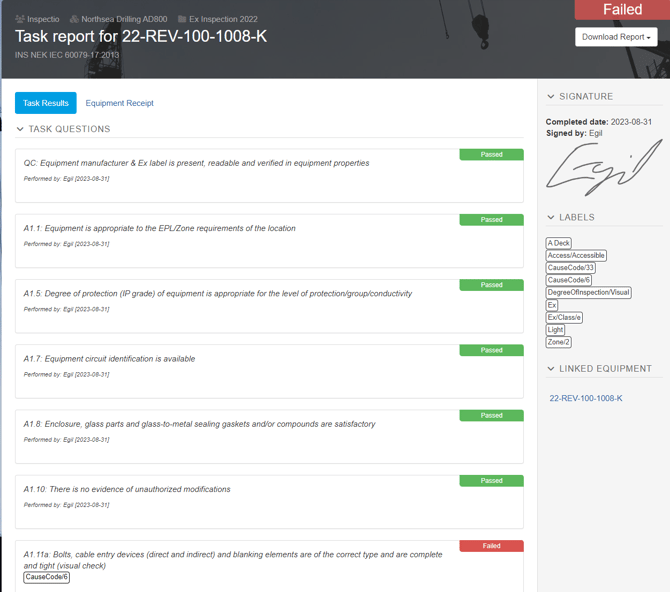
A main task in inspectio collects and stores all of the task information and consists of many elements.
The main task gets, calculates and stores the results from subtasks - Task Questions.
The main task gets all the information from the linked equipment and stores it in the Equipment Receipt.
The main task gets the information from the subtasks inspector(s) and stores the signature(s).
The main task checks for project requirements.
The main task stores the task state.
Sub Task:
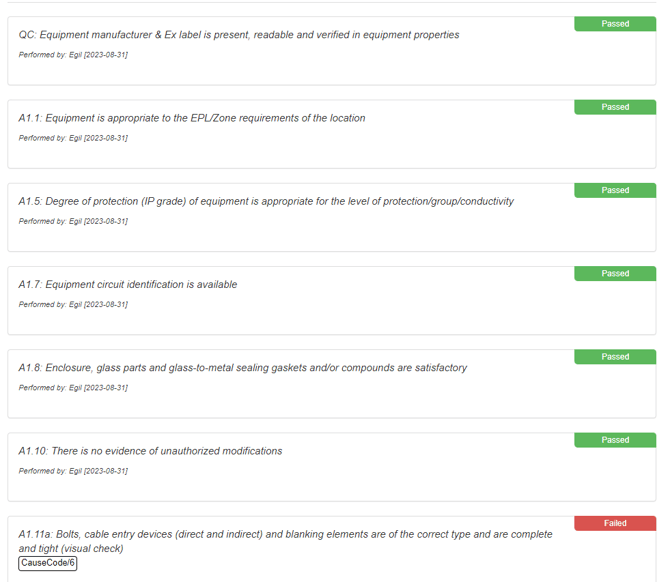
A sub task is the individual task question from the task template.
Information stored on the subtasks is collected as a whole in the main task.
Task Labels:
Task labels is only existing in the context of a task. Task labels on the main task enables the functionality alongside equipment labels to filter out task questions.
Task labels on the sub tasks become sub labels and enables the functionality set by rules.
Task State:
A task in inspectio can have four states; Not started, In progress, Completed and Discarded. Once a task is completed it needs to be re-opened for edit.
The dynamic functionality of filtering subtasks is only available on tasks not completed. Changes made to equipment, project and scope will only affect those tasks unless re-opened.
Once all subtasks has been given a result and the task requirements has been met the task can be completed.
Task Result:
Sub results is the individual results given to each sub task. Once the task is completed the main result is calculated.
Passed = one or more sub tasks is passed, no subtasks is failed or repaired.
Failed = one or more sub tasks is failed.
Repaired = one or more sub tasks is repaired, no subtasks is failed.
Discard is a subtask result but also a main task state. Discarding all subtasks will change the main task state to discarded.
Related articles:
Configure - Task Template
Configure - Rules
Labels - Explained