The Company or Asset Configuration menu is located in the top right corner of your Company or Asset Web Portal page.
Equipment Requirement configurations set on company level will automatically be enforced on all company assets. Assets can override settings individually on the asset page configuration, resetting to "default settings" will change the settings back to Company settings.
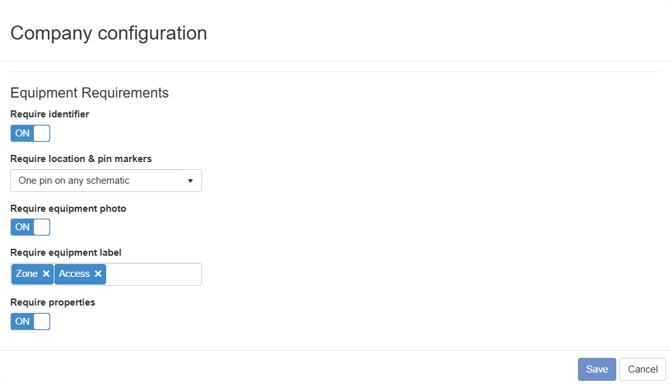
Equipment Requirements
Equipment Requirements will notify the app user and highlight if not met. Setting Equipment Requirements is a way to enforce data collection through the application. If set in a "project"[<- Insert link to project requirements] the requirements will also be enforced on task completion.
Require Identifier:
Will notify users of the application that an Equipment identifier is required if turned on. Available Identifier types will be highlighted in red.
Require location & pin markers:
No location requirement: Will not enforce any requirement on location or pin markers.
Location: Will require equipment to be assigned to a location.
One pin on any schematic: Will require equipment to be assigned to a location and have a pin marker placed on an available Schematic/General Arrangement Drawing.
Require equipment photo:
Will require the equipment to have at least one photo uploaded.
Require equipment label:
Select required equipment labels from list of available equipment labels. Label requirements not met will highlight said label in the application. Labels Explained
Require properties:
Will highlight required properties if the property does not have a value.